Automate notepad at the command line에서 설명하는 내용은 한글로 작동되지 않는다. 아래와 같이 바꿔야 됨.

How to use pywinauto with application languages other than English 참조

메모장 프로그램에서 글을 적고 바꾸기 한후 저장하는 예제

메모장 프로그램에서 글을 적고 바꾸기 한후 저장하는 예제


그림판을 띄우고 그림을 그리려 한다.
subprocess.run()을 사용하였더니 멈춘상태로 그대로 있어서
subprocess.Popen()을 사용하였더니 된다.

이유는 run()은 프로세스가 끝날때까지 기다려서 그런것이었음.

어떤 변수나 list에 정보를 추가하면서 재귀함수를 실행하려고,
함수외부에 global 변수를 선언하여 실행하였으나 코드가 지저분하고 찝찝해 했는데,
아래 예제와 같이 변수 선언을 함수의 argument에 하면 쉽게 해결된다.


아래 예제 둘다 비슷한것 같지만 미묘하게 다르다.
첫번째는 변수가 모듈에서 정의되었고, 함수안에서 global로 바꿨으니 다 적용되는거고
두번째 예제는 변수가 함수 안에서 정의되었다. 그래서 global로 바꿔도 아직 함수내에선 이전 변수내용이 그대로 적용되고 함수를 빠져나와서 global이 적용되었다.


In this tutorial you will learn how to:
We need two primary components:
our goal is to detect the highest matching area:
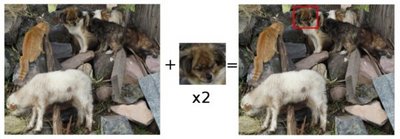
To identify the matching area, we have to compare the template image against the source image by sliding it:
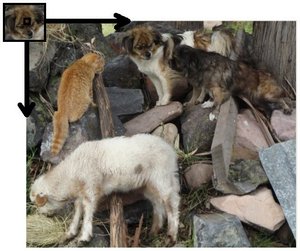
By sliding, we mean moving the patch one pixel at a time (left to right, up to down). At each location, a metric is calculated so it represents how “good” or “bad” the match at that location is (or how similar the patch is to that particular area of the source image).
For each location of T over I, you store the metric in the result matrix (R). Each location  in R contains the match metric:
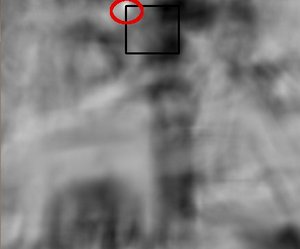 the image above is the result R of sliding the patch with a metric TM_CCORR_NORMED. The brightest locations indicate the highest matches. As you can see, the location marked by the red circle is probably the one with the highest value, so that location (the rectangle formed by that point as a corner and width and height equal to the patch image) is considered the match.
In practice, we use the function minMaxLoc to locate the highest value (or lower, depending of the type of matching method) in the R matrix.

iterable안에서 min 값을 구하는데 key는 lambda함수로 정해놓은 예제


 파이썬 학습노트